The best trading journal app depends on where you journal. If you review trades on your phone, Plancana, TraderSync and TradesViz are the only big journals with a native iOS and Android app. If you sit at a desk and import thousands of US stock and options trades, a desktop-first journal like TraderSync or Tradervue fits better.
We compared six of the most used trading journals on what decides whether you keep journaling: a real mobile app, a free plan, price, broker sync, and how much they help with the psychology behind your trades. Prices and plans were checked in October 2026.
Disclosure: Plancana is our app. We list where competitors are stronger, and you can check every price on their own sites.
Best Trading Journal Apps at a Glance
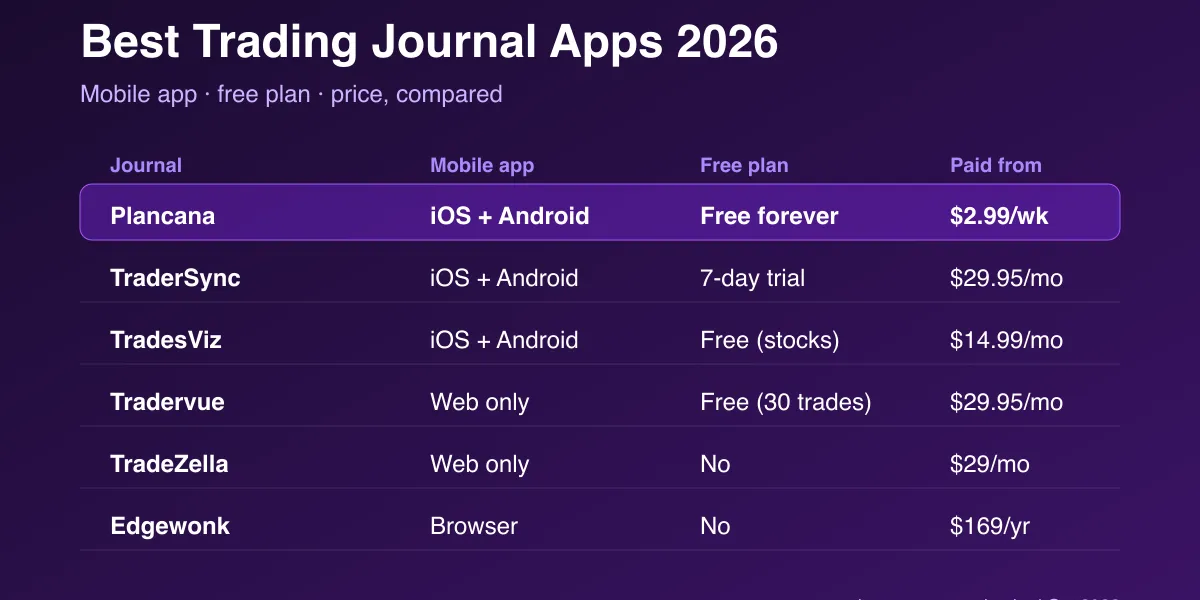
| Journal | Native mobile app | Free plan | Paid from | Best for |
|---|---|---|---|---|
| Plancana | Yes, iOS and Android | Yes, free forever | $2.99/week | Mobile journaling and trading psychology |
| TraderSync | Yes, iOS and Android | No (7-day trial) | $29.95/month | Active US stock and options traders |
| TradesViz | Yes, iOS and Android | Yes (stocks, monthly limits) | $14.99/month | Heavy analytics on a budget |
| Tradervue | No (web) | Yes (about 30 trades/month) | $29.95/month | Simple trade sharing and reports |
| TradeZella | No (web) | No | $29/month | Desktop playbooks and replay |
| Edgewonk | No (browser) | No | $169/year | Deep custom statistics for one-time payment |
How We Picked
A journal only helps if you open it after every trade. So we weighted the things that make that habit easy:
- A real mobile app. Most retail traders place and review trades on their phone. A website squeezed onto a phone screen is not the same.
- A free way to start. You should be able to test a journal on your own trades before paying.
- Price. Most desktop journals cost $29 a month or more. That adds up for a trader with a small account.
- Broker sync. Automatic imports remove the boring part of journaling.
- Psychology. Most losses come from rule-breaking, not bad setups. A journal that tracks your emotions shows you why you lost, not just how much.
1. Plancana: Best Trading Journal App for Mobile and Psychology
Plancana is a native trading journal app for iPhone and Android, rated 4.7★ on the App Store and 4.8★ on Google Play. It is built around the question most journals skip: what state were you in when you took the trade?
- Free forever: manual journaling, weekly analytics and the Trading Plan Generator. No card and no trial clock. See what’s in the free trading journal.
- Paid from $2.99/week: Basic adds the AI Trading Mentor and monthly and yearly analytics. Pro (from $8.99/week) adds automatic broker sync for MT4, MT5, cTrader, Bybit and TradeLocker. See supported platforms.
- Psychology first: log your mood before and after each trade, then let the AI find patterns such as revenge trades after a loss or oversized positions when you are anxious.
Where it falls short: no CSV import, and no automatic import from US stock and options brokers such as Interactive Brokers or thinkorswim. Options are logged by hand.
Best for: forex, crypto, futures and prop firm traders who want to journal on their phone and fix the emotional side of their trading.
2. TraderSync: Best for Active US Stock and Options Traders
TraderSync is one of the most complete desktop journals, with native iOS and Android apps and imports from hundreds of brokers. Its AI assistant reviews your trades, and higher tiers add trade replay and coaching features.
- Price: Pro $29.95/month, Premium $49.95/month, Elite $79.95/month. Annual billing is cheaper.
- Free plan: none, but there is a 7-day trial.
- Where it falls short: price, and the most useful AI features sit on the top tiers.
Best for: active stock and options traders who import a lot of executions. Read our TraderSync comparison.
3. TradesViz: Best Analytics for the Money
TradesViz packs more charts and statistics per dollar than any other journal here, and it has iOS and Android apps. The mobile app is a lighter companion to the desktop site.
- Price: from $14.99/month.
- Free plan: yes, for stocks, with monthly execution limits and one account.
- Where it falls short: the sheer number of options can overwhelm new traders, and psychology tracking is basic.
Best for: data-heavy traders who live on a desktop. Read our TradesViz alternative guide.
4. Tradervue: Best for Simple Reports and Sharing
Tradervue is one of the oldest journals and is known for clean reports and trade sharing. It is a web app with no native mobile app.
- Price: from $29.95/month.
- Free plan: yes, limited to about 30 imported trades a month.
- Where it falls short: no native app, and the interface has changed little in years.
Best for: stock traders who want straightforward reports. Read our Tradervue alternative guide.
5. TradeZella: Best for Desktop Playbooks
TradeZella is popular for its playbooks, trade replay and polished design. It is web-only, so there is no app to install on your phone.
- Price: from $29/month ($24/month billed annually).
- Free plan: none.
- Where it falls short: no mobile app and no free plan.
Best for: traders who review at a desk and want structured playbooks. Read our TradeZella comparison.
6. Edgewonk: Best for Deep Custom Statistics
Edgewonk is a long-standing journal with very flexible custom statistics, sold as an annual licence. It runs in the browser rather than as a phone app.
- Price: $169/year.
- Free plan: none.
- Where it falls short: a steep learning curve and no native mobile app.
Best for: systematic traders who want to slice their stats every possible way. Read our Edgewonk alternative guide.
Mobile App vs Desktop Journal: Which Do You Need?
Ask yourself when you actually review your trades.
- Right after the trade, on your phone: pick a journal with a native app. You will capture how you felt while it is fresh, which is the data that explains most losses. Plancana, TraderSync and TradesViz qualify.
- Once a day or week, at a desk, with thousands of executions: a desktop-first journal with deep imports fits better. TraderSync, Tradervue and TradeZella are built for this.
Many traders do both: a phone app for the habit and the emotions, and a deeper review at the weekend.
Which Trading Journal App Should You Choose?
- You trade forex, crypto, futures or a prop firm challenge, mostly from your phone: Plancana.
- You want to start free and stay free: Plancana, or Tradervue if you trade few US stocks.
- You trade US stocks and options heavily and want automatic imports: TraderSync.
- You want the most analytics for the lowest monthly price on desktop: TradesViz.
- You keep losing to revenge trading, FOMO or overtrading: a psychology-first journal. See our best trading psychology apps.
New to journaling? Start with the ultimate guide to a trading journal, then pick the app that fits how you trade.